<?xml version="1.0" encoding="utf-8"?><feed xmlns="http://www.w3.org/2005/Atom" ><generator uri="https://jekyllrb.com/" version="3.10.0">Jekyll</generator><link href="https://www.wenhao.ink/feed.xml" rel="self" type="application/atom+xml" /><link href="https://www.wenhao.ink/" rel="alternate" type="text/html" /><updated>2026-03-11T04:44:12+00:00</updated><id>https://www.wenhao.ink/feed.xml</id><title type="html">wenhao</title><subtitle>A (nearly) no-CSS, fast, minimalist Jekyll theme.
</subtitle><author><name>wenhao</name></author><entry><title type="html">用大模型翻译 EPUB：从占位符到最小干预</title><link href="https://www.wenhao.ink/epub-llm-translation-20260225/" rel="alternate" type="text/html" title="用大模型翻译 EPUB：从占位符到最小干预" /><published>2026-02-25T00:00:00+00:00</published><updated>2026-02-25T00:00:00+00:00</updated><id>https://www.wenhao.ink/epub-llm-translation-inline-tags</id><content type="html" xml:base="https://www.wenhao.ink/epub-llm-translation-20260225/"><![CDATA[<p>在开发 orange-translator 的过程中，我为一个问题折腾了好几个版本：<strong>如何处理 EPUB 里的 HTML 内联标签</strong>。</p>

<p>orange-translator 是一个将英文 EPUB 电子书翻译为双语版本的工具，译文紧跟原文段落之后，形成”原文 + 译文”交替排布的阅读体验。表面上看，翻译流程并不复杂：</p>

<div class="language-plaintext highlighter-rouge"><div class="highlight"><pre class="highlight"><code>EPUB 解包 → HTML 解析 → 文本提取 → LLM 批量翻译 → 双语重组 → EPUB 重新打包
</code></pre></div></div>

<p>真正让我踩坑的，是第三步和第四步之间的那道墙。</p>

<h2 id="核心挑战内联标签怎么办">核心挑战：内联标签怎么办</h2>

<p>EPUB 的 XHTML 里，一段文字往往不是纯文本，而是夹杂着各种内联标签：</p>

<div class="language-html highlighter-rouge"><div class="highlight"><pre class="highlight"><code><span class="nt">&lt;p&gt;</span>
  In <span class="nt">&lt;em&gt;</span>The Dhammapada<span class="nt">&lt;/em&gt;</span>, verse 103 reads:
  <span class="nt">&lt;sup&gt;&lt;a</span> <span class="na">href=</span><span class="s">"#fn1"</span><span class="nt">&gt;</span>1<span class="nt">&lt;/a&gt;&lt;/sup&gt;</span>
  "Conquer yourself<span class="nt">&lt;br/&gt;</span>rather than the world."
<span class="nt">&lt;/p&gt;</span>
</code></pre></div></div>

<p>里面有 <code class="language-plaintext highlighter-rouge">&lt;em&gt;</code>（斜体）、<code class="language-plaintext highlighter-rouge">&lt;sup&gt;</code>（脚注序号）、<code class="language-plaintext highlighter-rouge">&lt;a&gt;</code>（链接）、<code class="language-plaintext highlighter-rouge">&lt;br/&gt;</code>（换行）。</p>

<p>如果把整个 <code class="language-plaintext highlighter-rouge">inner_html</code> 原样送给 LLM，有几个问题：</p>
<ol>
  <li>HTML 标签大量占用 token，增加成本和延迟</li>
  <li>LLM 不擅长精确复制任意 HTML 结构，容易错位或丢失</li>
  <li>翻译后 <code class="language-plaintext highlighter-rouge">&lt;em&gt;</code> 里的词可能位置变了，硬保留反而不自然</li>
</ol>

<p><strong>真正的问题</strong>：哪些标签必须保留？哪些可以丢弃？哪些需要特殊处理？</p>

<h2 id="第一个方案占位符">第一个方案：占位符</h2>

<p>直觉上，这是个”显然”的解法：把内联标签替换为 LLM 可以透传的占位符，翻译完后再还原。</p>

<h3 id="数学括号-n">数学括号 <code class="language-plaintext highlighter-rouge">⟦N⟧</code></h3>

<p>第一版用 Unicode 数学白方括号 <code class="language-plaintext highlighter-rouge">⟦N⟧</code>（U+27E6/U+27E7）作为占位符，透明标签用 <code class="language-plaintext highlighter-rouge">⟦0⟧content⟦/0⟧</code>，不透明标签用 <code class="language-plaintext highlighter-rouge">⟦0⟧</code>。</p>

<p><strong>问题</strong>：翻译模型（translategemma:4b）把 <code class="language-plaintext highlighter-rouge">⟦⟧</code> 翻译成了 <code class="language-plaintext highlighter-rouge">《》</code>。</p>

<p>输出变成了这样：</p>

<div class="language-plaintext highlighter-rouge"><div class="highlight"><pre class="highlight"><code>《0》《/0》托《1》奥《/1》曼尼《2》
</code></pre></div></div>

<p>根本原因：LLM 的训练数据中 <code class="language-plaintext highlighter-rouge">⟦</code> 极少见，模型会把它当作”奇怪的外语括号”进行翻译，而 <code class="language-plaintext highlighter-rouge">《》</code> 是它见过的最相似的括号形式。</p>

<p><strong>教训</strong>：占位符不能用模型训练数据中罕见的字符。</p>

<h3 id="xml-风格标签-gn">XML 风格标签 <code class="language-plaintext highlighter-rouge">&lt;gN&gt;</code></h3>

<p>改用 <code class="language-plaintext highlighter-rouge">&lt;g0&gt;content&lt;/g0&gt;</code> 表示透明标签，<code class="language-plaintext highlighter-rouge">&lt;x0/&gt;</code> 表示不透明标签。<code class="language-plaintext highlighter-rouge">&lt;g&gt;</code> 和 <code class="language-plaintext highlighter-rouge">&lt;x&gt;</code> 在 HTML 中不存在，模型不会把它们当真实 HTML 处理——理论上。</p>

<p><strong>问题</strong>：不透明的自闭合 <code class="language-plaintext highlighter-rouge">&lt;x0/&gt;</code> 被模型扩展为 <code class="language-plaintext highlighter-rouge">&lt;x0&gt;内容&lt;/x0&gt;</code>。</p>

<p>模型看到一个孤立的 <code class="language-plaintext highlighter-rouge">&lt;x0/&gt;</code> 没有内容，觉得不合理，于是自作主张给它配了内容。</p>

<h3 id="token-风格-otn">Token 风格 <code class="language-plaintext highlighter-rouge">[OT:N]</code></h3>

<p>将不透明标签改为更像”标记/代码”而非”HTML 标签”的格式 <code class="language-plaintext highlighter-rouge">[OT:N]</code>。</p>

<p><code class="language-plaintext highlighter-rouge">《》</code> 问题消失了，但新问题出现了：<strong><code class="language-plaintext highlighter-rouge">[OT:N]</code> 被模型概率性丢弃</strong>。</p>

<p>有时候输出完整，有时候 <code class="language-plaintext highlighter-rouge">[OT:0]</code> 凭空消失。丢弃率和 batch 大小、上下文长度、模型状态都有关，不可预测。</p>

<h2 id="占位符方案的根本矛盾">占位符方案的根本矛盾</h2>

<p>到这里，我意识到占位符方案存在<strong>根本性矛盾</strong>。</p>

<p>LLM 的翻译本质是：给定源语言文本，生成目标语言的自然表达。它的整个训练目标是生成流畅自然的人类语言。</p>

<p>而占位符要求模型做相反的事：在自然语言输出中，精确地、不遗漏地复制一些非自然语言符号。这与模型的优化目标是冲突的。</p>

<p>小模型尤其无法可靠地完成这个”规则遵从”任务，因为它没有足够的上下文理解能力来始终遵守指令。</p>

<h2 id="重新审视哪些标签真的需要保留">重新审视：哪些标签真的需要保留</h2>

<p>关键洞察来自对<strong>双语 EPUB 使用场景</strong>的重新审视：</p>

<blockquote>
  <p>在双语 EPUB 中，原文就在译文正上方。读者可以直接看到原文的完整格式——斜体、粗体、超链接都在。译文的作用是”帮助理解原文”，而不是”替代原文”。</p>
</blockquote>

<p>这意味着：</p>
<ul>
  <li><code class="language-plaintext highlighter-rouge">&lt;em&gt;</code>、<code class="language-plaintext highlighter-rouge">&lt;strong&gt;</code>、<code class="language-plaintext highlighter-rouge">&lt;span&gt;</code> 等装饰性格式在译文中<strong>可以丢弃</strong>，原文已经有了</li>
  <li><code class="language-plaintext highlighter-rouge">&lt;a href&gt;</code> 链接在译文中<strong>意义不大</strong></li>
  <li><code class="language-plaintext highlighter-rouge">&lt;br/&gt;</code> 是<strong>结构性换行</strong>，必须保留（诗歌、台词等场景）</li>
  <li><code class="language-plaintext highlighter-rouge">&lt;sup&gt;/&lt;sub&gt;</code> 通常是<strong>脚注序号</strong>，丢失了脚注引用就断了</li>
  <li><code class="language-plaintext highlighter-rouge">&lt;a id="N"/&gt;</code> 空锚点是页码标记，<strong>完全不可见</strong>，直接丢弃即可</li>
</ul>

<p>一句话：<strong>只有影响内容可读性的结构才需要保留，纯装饰性格式可以丢弃。</strong></p>

<h2 id="最小干预方案">最小干预方案</h2>

<p>基于这个认识，放弃占位符，改为”最小干预预处理”：</p>

<div class="language-python highlighter-rouge"><div class="highlight"><pre class="highlight"><code><span class="k">def</span> <span class="nf">preprocess_for_translation</span><span class="p">(</span><span class="n">inner_html</span><span class="p">:</span> <span class="nb">str</span><span class="p">)</span> <span class="o">-&gt;</span> <span class="nb">tuple</span><span class="p">[</span><span class="nb">str</span><span class="p">,</span> <span class="nb">str</span><span class="p">]:</span>
    <span class="n">soup</span> <span class="o">=</span> <span class="n">BeautifulSoup</span><span class="p">(</span><span class="sa">f</span><span class="s">"&lt;div&gt;</span><span class="si">{</span><span class="n">inner_html</span><span class="si">}</span><span class="s">&lt;/div&gt;"</span><span class="p">,</span> <span class="s">"html.parser"</span><span class="p">)</span>
    <span class="n">div</span> <span class="o">=</span> <span class="n">soup</span><span class="p">.</span><span class="n">find</span><span class="p">(</span><span class="s">"div"</span><span class="p">)</span>

    <span class="c1"># 1. 规范化文本节点中的 \n 为空格，避免后续与 &lt;br/&gt; 转换的 \n 混淆
</span>    <span class="k">for</span> <span class="n">text_node</span> <span class="ow">in</span> <span class="nb">list</span><span class="p">(</span><span class="n">div</span><span class="p">.</span><span class="n">find_all</span><span class="p">(</span><span class="n">string</span><span class="o">=</span><span class="bp">True</span><span class="p">)):</span>
        <span class="n">s</span> <span class="o">=</span> <span class="nb">str</span><span class="p">(</span><span class="n">text_node</span><span class="p">)</span>
        <span class="k">if</span> <span class="s">"</span><span class="se">\n</span><span class="s">"</span> <span class="ow">in</span> <span class="n">s</span><span class="p">:</span>
            <span class="n">text_node</span><span class="p">.</span><span class="n">replace_with</span><span class="p">(</span><span class="n">NavigableString</span><span class="p">(</span><span class="n">s</span><span class="p">.</span><span class="n">replace</span><span class="p">(</span><span class="s">"</span><span class="se">\n</span><span class="s">"</span><span class="p">,</span> <span class="s">" "</span><span class="p">)))</span>

    <span class="c1"># 2. &lt;br/&gt; → \n（LLM 能自然保留换行）
</span>    <span class="k">for</span> <span class="n">br</span> <span class="ow">in</span> <span class="nb">list</span><span class="p">(</span><span class="n">div</span><span class="p">.</span><span class="n">find_all</span><span class="p">(</span><span class="s">"br"</span><span class="p">)):</span>
        <span class="n">br</span><span class="p">.</span><span class="n">replace_with</span><span class="p">(</span><span class="n">NavigableString</span><span class="p">(</span><span class="s">"</span><span class="se">\n</span><span class="s">"</span><span class="p">))</span>

    <span class="c1"># 3. 空锚点直接剥离
</span>    <span class="k">for</span> <span class="n">a</span> <span class="ow">in</span> <span class="nb">list</span><span class="p">(</span><span class="n">div</span><span class="p">.</span><span class="n">find_all</span><span class="p">(</span><span class="s">"a"</span><span class="p">)):</span>
        <span class="k">if</span> <span class="ow">not</span> <span class="n">a</span><span class="p">.</span><span class="n">get_text</span><span class="p">(</span><span class="n">strip</span><span class="o">=</span><span class="bp">True</span><span class="p">):</span>
            <span class="n">a</span><span class="p">.</span><span class="n">decompose</span><span class="p">()</span>

    <span class="c1"># 4. 装饰性内联标签：保留文字内容，丢弃标签本身
</span>    <span class="k">for</span> <span class="n">tag_name</span> <span class="ow">in</span> <span class="n">_STRIP_INLINE</span><span class="p">:</span>  <span class="c1"># em, strong, b, i, span, a, ...
</span>        <span class="k">for</span> <span class="n">tag</span> <span class="ow">in</span> <span class="nb">list</span><span class="p">(</span><span class="n">div</span><span class="p">.</span><span class="n">find_all</span><span class="p">(</span><span class="n">tag_name</span><span class="p">)):</span>
            <span class="n">tag</span><span class="p">.</span><span class="n">unwrap</span><span class="p">()</span>

    <span class="c1"># 5. sup/sub/img/wbr 保留原始 HTML 不动
</span>
    <span class="k">return</span> <span class="n">div</span><span class="p">.</span><span class="n">decode_contents</span><span class="p">(),</span> <span class="n">br_html</span>
</code></pre></div></div>

<p>还原时，把翻译结果中的 <code class="language-plaintext highlighter-rouge">\n</code> 替换回原始的 <code class="language-plaintext highlighter-rouge">&lt;br/&gt;</code> 字符串（保留 calibre 生成的 class 属性）。</p>

<h3 id="几个值得注意的细节">几个值得注意的细节</h3>

<p><strong>为什么先规范化文本节点中的 <code class="language-plaintext highlighter-rouge">\n</code>？</strong></p>

<p>XHTML 源文件里有时会有文本节点包含换行符（排版用途）。如果不先规范化，这些 <code class="language-plaintext highlighter-rouge">\n</code> 会和 <code class="language-plaintext highlighter-rouge">&lt;br/&gt;</code> 转换来的 <code class="language-plaintext highlighter-rouge">\n</code> 混淆，还原时会多出多余的 <code class="language-plaintext highlighter-rouge">&lt;br/&gt;</code>。</p>

<p><strong><code class="language-plaintext highlighter-rouge">&lt;sup&gt;/&lt;sub&gt;</code> 为什么不用占位符？</strong></p>

<p>实测发现，<code class="language-plaintext highlighter-rouge">&lt;sup&gt;1&lt;/sup&gt;</code> 这类短标签 LLM 能正确透传——它足够短，不像乱码，模型见过足够多的 HTML 上下文，知道要原样保留。长段落中的复杂嵌套才是问题。</p>

<h3 id="效果对比">效果对比</h3>

<table>
  <thead>
    <tr>
      <th>方案</th>
      <th>速度</th>
      <th>缺陷</th>
    </tr>
  </thead>
  <tbody>
    <tr>
      <td><code class="language-plaintext highlighter-rouge">⟦N⟧</code> 占位符</td>
      <td>基准</td>
      <td><code class="language-plaintext highlighter-rouge">⟦⟧</code> → <code class="language-plaintext highlighter-rouge">《》</code> 转译</td>
    </tr>
    <tr>
      <td><code class="language-plaintext highlighter-rouge">&lt;gN&gt;</code>/<code class="language-plaintext highlighter-rouge">&lt;xN/&gt;</code></td>
      <td>-5%</td>
      <td><code class="language-plaintext highlighter-rouge">&lt;xN/&gt;</code> 被扩展为含内容标签</td>
    </tr>
    <tr>
      <td><code class="language-plaintext highlighter-rouge">&lt;gN&gt;</code>/<code class="language-plaintext highlighter-rouge">[OT:N]</code></td>
      <td>-10%</td>
      <td><code class="language-plaintext highlighter-rouge">[OT:N]</code> 概率性丢弃</td>
    </tr>
    <tr>
      <td><strong>最小干预（最终）</strong></td>
      <td><strong>+22%</strong></td>
      <td><strong>无已知缺陷</strong></td>
    </tr>
  </tbody>
</table>

<p>速度提升的原因：送给 LLM 的文本更短，prompt token 减少，批次解析失败率降为零。</p>

<h2 id="其他踩坑记录">其他踩坑记录</h2>

<h3 id="批量翻译的分段解析">批量翻译的分段解析</h3>

<p>批量翻译时用编号标记让 LLM 分段返回：<code class="language-plaintext highlighter-rouge">[1]</code>、<code class="language-plaintext highlighter-rouge">[2]</code>……解析时用正则 <code class="language-plaintext highlighter-rouge">\[(\d+)\]</code> 切分。</p>

<p>模型偶尔会把多段合并，或者跳过某个编号。解决方案是<strong>递归对半重试</strong>：10 段失败，拆成两个 5 段重试，直到单段为止。单段永远可以直接返回，无需解析。</p>

<h3 id="readtimeout-与流式-api">ReadTimeout 与流式 API</h3>

<p>用 <code class="language-plaintext highlighter-rouge">httpx</code> 调 Ollama 时，非流式 API 需要等待完整响应。对于长段落，生成时间可能超过 300 秒，触发 <code class="language-plaintext highlighter-rouge">ReadTimeout</code>。</p>

<p>改用流式 API（<code class="language-plaintext highlighter-rouge">stream: true</code>），用 <code class="language-plaintext highlighter-rouge">aiter_lines()</code> 逐行消费。流式模式下，timeout 针对相邻两个 chunk 之间的等待时间（设为 60 秒），而不是整个响应时间。</p>

<h3 id="续翻支持">续翻支持</h3>

<p>翻译 300 章的大部头时中途崩溃，已翻译的部分不能白费。</p>

<p>实现：每章完成后写入 <code class="language-plaintext highlighter-rouge">.ot-cache/&lt;md5&gt;.xhtml</code>，同时更新 <code class="language-plaintext highlighter-rouge">progress.json</code>。<strong>只有全部章节无错误完成时，才清理缓存</strong>。有失败章节时，保留缓存，下次运行自动重翻失败的章节。</p>

<h2 id="总结">总结</h2>

<p>回头看这次折腾，走弯路的根本原因是：<strong>我在用错误的方式提问</strong>。</p>

<p>一开始我问的是”如何让 LLM 精确透传 HTML 标签”，这是个错误的问题。LLM 的优化目标是生成流畅的自然语言，不是规则遵从。我想让它做的事，恰好和它的本质相违背。</p>

<p>换一个问题：<strong>“哪些格式信息对读者真正重要？”</strong> 一旦把问题问对了，答案就清晰了——在双语阅读场景下，原文就在旁边，大量格式信息根本不需要在译文中重复。</p>

<p>让模型做它擅长的事，自己处理规则性的事。这条原则不只适用于 LLM 翻译，适用于所有工具的使用。</p>

<h2 id="引用">引用</h2>

<ul>
  <li><a href="https://github.com/ollama/ollama/blob/main/docs/api.md">Ollama API 文档</a></li>
</ul>]]></content><author><name>Leo</name></author><category term="programme" /><category term="python" /><category term="epub" /><category term="llm" /><category term="翻译" /><summary type="html"><![CDATA[在开发 orange-translator 的过程中，我为一个问题折腾了好几个版本：如何处理 EPUB 里的 HTML 内联标签。]]></summary></entry><entry><title type="html">拆解 Python 对象模型</title><link href="https://www.wenhao.ink/python-pyobject-metaclass-20251210/" rel="alternate" type="text/html" title="拆解 Python 对象模型" /><published>2025-12-10T00:00:00+00:00</published><updated>2025-12-10T00:00:00+00:00</updated><id>https://www.wenhao.ink/python-pyobject-metaclass</id><content type="html" xml:base="https://www.wenhao.ink/python-pyobject-metaclass-20251210/"><![CDATA[<p>很多 Python 开发者写了很多年代码，但对 Python 的底层世界依然感觉雾里看花。</p>

<p>你是否思考过这些问题：</p>
<ul>
  <li>为什么常说“Python 中一切皆对象”，连函数和类也是对象？</li>
  <li>为什么 Python 的变量不需要声明类型？</li>
  <li><code class="language-plaintext highlighter-rouge">type</code> 和 <code class="language-plaintext highlighter-rouge">object</code> 到底是什么关系？为什么 <code class="language-plaintext highlighter-rouge">type(object)</code> 是 <code class="language-plaintext highlighter-rouge">type</code>，而 <code class="language-plaintext highlighter-rouge">object</code> 又是 <code class="language-plaintext highlighter-rouge">type</code> 的父类？</li>
</ul>

<p>如果不理解这些，你只是在用 Python 写 C 代码；理解了这些，你才能真正掌握 Python 的“动态之力”。今天，我们就深入 CPython 的源码层面，拆解 Python 的对象模型。</p>

<hr />

<h2 id="一-底层解剖pyobject-是万物之源">一、 底层解剖：PyObject 是万物之源</h2>

<p>Python 的灵活性源于一个核心设计：<strong>所有东西在底层都是同一个结构体。</strong></p>

<p>由于 CPython 是用 C 语言写的，当你创建一个整数 <code class="language-plaintext highlighter-rouge">a = 10</code>，或者定义一个函数 <code class="language-plaintext highlighter-rouge">def func(): pass</code>，在内存中它们并没有本质区别，它们都对应着 C 语言层面的一个结构体——<strong><code class="language-plaintext highlighter-rouge">PyObject</code></strong>。</p>

<p>每一个 Python 对象，在内存头部都至少包含两个核心字段：</p>

<ol>
  <li><strong><code class="language-plaintext highlighter-rouge">ob_refcnt</code> (引用计数)：</strong>
    <ul>
      <li>记录有多少个变量指向这个对象。当它变为 0 时，对象会被垃圾回收机制（GC）立即销毁。</li>
    </ul>
  </li>
  <li><strong><code class="language-plaintext highlighter-rouge">ob_type</code> (类型指针)：</strong>
    <ul>
      <li>这是一个指针，指向该对象所属的<strong>类对象</strong>（Type Object）。</li>
      <li>比如整数 <code class="language-plaintext highlighter-rouge">10</code> 的 <code class="language-plaintext highlighter-rouge">ob_type</code> 指向 <code class="language-plaintext highlighter-rouge">int</code> 类。这个指针告诉解释器：“我是一个整数，我支持加减乘除”。</li>
    </ul>
  </li>
</ol>

<p><strong>结论：</strong> 无论外表多复杂，Python 对象的内核都是一个挂着“引用计数”和“类型标签”的 C 结构体。</p>

<hr />

<h2 id="二-核心隐喻变量是便利贴不是盒子">二、 核心隐喻：变量是“便利贴”，不是“盒子”</h2>

<p>理解对象模型的关键，在于纠正对“变量”的理解。</p>

<ul>
  <li><strong>在 C/Java 中：</strong> <code class="language-plaintext highlighter-rouge">int a = 10;</code> 就像申请了一个名字叫 <code class="language-plaintext highlighter-rouge">a</code> 的<strong>盒子</strong>，把数字 10 放进去。赋值 <code class="language-plaintext highlighter-rouge">b = a</code> 是把 10 复制一份放到 <code class="language-plaintext highlighter-rouge">b</code> 盒子里。</li>
  <li><strong>在 Python 中：</strong> <code class="language-plaintext highlighter-rouge">a = 10</code> 就像在内存里吹起了一个<strong>气球</strong>（对象 10），然后拿一张写着 <code class="language-plaintext highlighter-rouge">a</code> 的<strong>便利贴</strong>（变量名）贴在气球上。
    <ul>
      <li>当你执行 <code class="language-plaintext highlighter-rouge">b = a</code> 时，<strong>不是复制气球</strong>，而是拿一张写着 <code class="language-plaintext highlighter-rouge">b</code> 的便利贴，贴在<strong>同一个</strong>气球上。</li>
    </ul>
  </li>
</ul>

<p>这就是为什么 Python 的参数传递全是<strong>引用传递（Pass by Assignment）</strong>。这也解释了 Python 的“三位一体”特性，任何对象都有：</p>
<ol>
  <li><strong>Identity（身份）：</strong> 内存地址（<code class="language-plaintext highlighter-rouge">id(obj)</code>）。</li>
  <li><strong>Type（类型）：</strong> 它的模具是哪个类（<code class="language-plaintext highlighter-rouge">type(obj)</code>）。</li>
  <li><strong>Value（值）：</strong> 气球里的内容。</li>
</ol>

<hr />

<h2 id="三-终极烧脑type-和-object-的鸡蛋悖论">三、 终极烧脑：type 和 object 的“鸡蛋悖论”</h2>

<p>Python 对象模型中最令人困惑，也最精妙的设计，莫过于 <code class="language-plaintext highlighter-rouge">type</code> 和 <code class="language-plaintext highlighter-rouge">object</code> 的关系。它们构成了对象系统的时空闭环。</p>

<h3 id="31-两个主角">3.1 两个主角</h3>
<ul>
  <li><strong><code class="language-plaintext highlighter-rouge">object</code>（万物之祖）：</strong> 它是<strong>继承链</strong>的终点。所有的类（<code class="language-plaintext highlighter-rouge">int</code>, <code class="language-plaintext highlighter-rouge">str</code>, <code class="language-plaintext highlighter-rouge">MyClass</code>）默认都继承自它。它定义了对象最基本的行为（如 <code class="language-plaintext highlighter-rouge">__hash__</code>）。</li>
  <li><strong><code class="language-plaintext highlighter-rouge">type</code>（万物之主）：</strong> 它是<strong>实例化链</strong>的源头。也就是所谓的“元类”（Metaclass）。所有的类（包括 <code class="language-plaintext highlighter-rouge">object</code>）本质上都是 <code class="language-plaintext highlighter-rouge">type</code> 创建出来的实例。</li>
</ul>

<h3 id="32-只有两句话是真的">3.2 只有两句话是真的</h3>
<p>如果你被绕晕了，只需要记住这两句“绝对真理”：</p>
<ol>
  <li><strong><code class="language-plaintext highlighter-rouge">type</code> 是 <code class="language-plaintext highlighter-rouge">object</code> 的子类。</strong> （继承维度：<code class="language-plaintext highlighter-rouge">type</code> 也是个类，所以它得认 <code class="language-plaintext highlighter-rouge">object</code> 做父类）</li>
  <li><strong><code class="language-plaintext highlighter-rouge">object</code> 是 <code class="language-plaintext highlighter-rouge">type</code> 的实例。</strong> （实例化维度：<code class="language-plaintext highlighter-rouge">object</code> 这个类对象，是由 <code class="language-plaintext highlighter-rouge">type</code> 制造出来的）</li>
</ol>

<div class="language-python highlighter-rouge"><div class="highlight"><pre class="highlight"><code><span class="k">print</span><span class="p">(</span><span class="nb">issubclass</span><span class="p">(</span><span class="nb">type</span><span class="p">,</span> <span class="nb">object</span><span class="p">))</span>  <span class="c1"># True
</span><span class="k">print</span><span class="p">(</span><span class="nb">isinstance</span><span class="p">(</span><span class="nb">object</span><span class="p">,</span> <span class="nb">type</span><span class="p">))</span>  <span class="c1"># True
</span><span class="k">print</span><span class="p">(</span><span class="nb">isinstance</span><span class="p">(</span><span class="nb">type</span><span class="p">,</span> <span class="nb">type</span><span class="p">))</span>    <span class="c1"># True (自己造自己)
</span></code></pre></div></div>

<h3 id="33-源码揭秘c-语言层面的神级操作">3.3 源码揭秘：C 语言层面的神级操作</h3>

<p>你可能会问：这逻辑不通啊？如果是 <code class="language-plaintext highlighter-rouge">type</code> 造了 <code class="language-plaintext highlighter-rouge">object</code>，那在 <code class="language-plaintext highlighter-rouge">type</code> 诞生之前 <code class="language-plaintext highlighter-rouge">object</code> 应该不存在；但 <code class="language-plaintext highlighter-rouge">type</code> 又继承自 <code class="language-plaintext highlighter-rouge">object</code>，说明 <code class="language-plaintext highlighter-rouge">type</code> 诞生前 <code class="language-plaintext highlighter-rouge">object</code> 必须存在。这不就是死锁了吗？</p>

<p>在 C 语言实现的底层（CPython 源码），开发者通过<strong>精妙的指针操作</strong>解决了这个“先有鸡还是先有蛋”的问题。这是一个人工打破死循环的过程：</p>

<ol>
  <li><strong>先定义结构体：</strong>
C 语言代码中，先静态定义了两个核心结构体：
    <ul>
      <li><code class="language-plaintext highlighter-rouge">PyType_Type</code>（对应 Python 里的 <code class="language-plaintext highlighter-rouge">type</code>）</li>
      <li><code class="language-plaintext highlighter-rouge">PyBaseObject_Type</code>（对应 Python 里的 <code class="language-plaintext highlighter-rouge">object</code>）</li>
    </ul>
  </li>
  <li><strong>手动连接（Bootstrap）：</strong>
此时它们还只是孤立的 C 结构体，编译器无法处理这种互相依赖。于是，CPython 在初始化时进行了“手动硬连线”：
    <ul>
      <li><strong>让 type 成为自己的实例：</strong> 把 <code class="language-plaintext highlighter-rouge">PyType_Type</code> 的 <code class="language-plaintext highlighter-rouge">ob_type</code> 指针指向它自己（<code class="language-plaintext highlighter-rouge">&amp;PyType_Type</code>）。</li>
      <li><strong>让 type 继承 object：</strong> 把 <code class="language-plaintext highlighter-rouge">PyType_Type</code> 的 <code class="language-plaintext highlighter-rouge">tp_base</code> 指针指向 <code class="language-plaintext highlighter-rouge">PyBaseObject_Type</code>。</li>
      <li><strong>让 object 成为 type 的实例：</strong> 把 <code class="language-plaintext highlighter-rouge">PyBaseObject_Type</code> 的 <code class="language-plaintext highlighter-rouge">ob_type</code> 指针指向 <code class="language-plaintext highlighter-rouge">PyType_Type</code>。</li>
    </ul>
  </li>
</ol>

<p>这种“我指你，你指我，我自己指我自己”的操作，在 C 语言层面完美闭合了逻辑环。</p>

<h3 id="34-为什么这么设计">3.4 为什么这么设计？</h3>

<p>这种看似复杂的环形设计，实际上是为了保证 <strong>Python 对象模型的一致性</strong>：</p>

<ul>
  <li><strong>没有特例：</strong> 在 Python 中，一切皆对象。既然 <code class="language-plaintext highlighter-rouge">type</code> 和 <code class="language-plaintext highlighter-rouge">object</code> 也是对象，它们就必须遵守对象的规则（有类型、有父类）。</li>
  <li><strong>逻辑闭环：</strong> 通过让两者互为依托，Python 关闭了对象系统的顶层逻辑。这确保了无论你在系统中怎么回溯，永远不会遇到一个“不是对象”的东西。</li>
</ul>

<h3 id="35-形象类比">3.5 形象类比</h3>
<ul>
  <li><strong><code class="language-plaintext highlighter-rouge">object</code> 就像是“塑料”这种材质。</strong></li>
  <li><strong><code class="language-plaintext highlighter-rouge">type</code> 就像是“制造模具的机器”。</strong></li>
  <li><strong>源码层面的操作：</strong> 工程师先用手捏了一个“最初的机器”（静态定义的结构体），然后用这台机器造出了所有后续的模具，最后甚至给这台机器贴上了“塑料制造”的标签。</li>
</ul>

<hr />

<h2 id="四-动态机制类亦是对象与属性查找">四、 动态机制：类亦是对象与属性查找</h2>

<p>基于上述模型，Python 衍生出了极具动态特性的行为。</p>

<h3 id="1-类也是对象first-class-citizen">1. 类也是对象（First-class Citizen）</h3>
<p>在 Python 中，<code class="language-plaintext highlighter-rouge">class Dog:</code> 这行代码执行完后，内存里真真切切地产生了一个名为 <code class="language-plaintext highlighter-rouge">Dog</code> 的对象。
正因为类是对象，所以：</p>
<ul>
  <li>你可以把类赋值给变量。</li>
  <li>你可以把类当参数传给函数。</li>
  <li>你可以在运行时动态修改类的属性（Monkey Patching）。</li>
</ul>

<h3 id="2-属性查找attribute-lookup">2. 属性查找（Attribute Lookup）</h3>
<p>当你敲下 <code class="language-plaintext highlighter-rouge">obj.x</code> 时，Python 不会像 C++ 那样去偏移内存地址，而是启动了一次<strong>哈希查找</strong>：</p>
<ol>
  <li>先去 <code class="language-plaintext highlighter-rouge">obj.__dict__</code>（实例字典）里找。</li>
  <li>没找到？去 <code class="language-plaintext highlighter-rouge">obj.__class__.__dict__</code>（类字典）里找。</li>
  <li>还没找到？顺着 MRO（方法解析顺序）去父类字典里找。</li>
  <li>实在没有？调用 <code class="language-plaintext highlighter-rouge">__getattr__</code> 给你最后一次机会。</li>
</ol>

<p>这种机制虽然比指针偏移慢，但它带来了无与伦比的灵活性。</p>

<hr />

<h2 id="五-总结">五、 总结</h2>

<p>Python 的对象模型是一种<strong>用空间（内存）和时间（速度）换取极致灵活性</strong>的艺术。</p>

<ul>
  <li><strong>统一性：</strong> 无论是整数、函数还是类，众生平等，皆为对象。</li>
  <li><strong>元编程：</strong> 通过控制 <code class="language-plaintext highlighter-rouge">type</code>（元类），你可以控制类的创建过程，这是 Django ORM 等黑魔法的基石。</li>
  <li><strong>自洽性：</strong> 正是 C 语言底层那一次“精妙的指针连接”，让 <code class="language-plaintext highlighter-rouge">type</code> 和 <code class="language-plaintext highlighter-rouge">object</code> 互为支撑，构建了一个逻辑完美自洽的动态世界。</li>
</ul>

<p>当你下次写下 <code class="language-plaintext highlighter-rouge">class MyClass</code> 时，希望你能意识到：你不仅仅是在写代码，你是在指挥 <code class="language-plaintext highlighter-rouge">type</code> 这位造物主，用 <code class="language-plaintext highlighter-rouge">object</code> 这种基底材质，为你创造一个新的世界。</p>]]></content><author><name>Gemini</name></author><category term="programme" /><category term="python" /><category term="AIGC" /><summary type="html"><![CDATA[很多 Python 开发者写了很多年代码，但对 Python 的底层世界依然感觉雾里看花。]]></summary></entry><entry><title type="html">Python导入与路径</title><link href="https://www.wenhao.ink/python-package-import-20250922/" rel="alternate" type="text/html" title="Python导入与路径" /><published>2025-09-22T00:00:00+00:00</published><updated>2025-09-22T00:00:00+00:00</updated><id>https://www.wenhao.ink/python-package-import</id><content type="html" xml:base="https://www.wenhao.ink/python-package-import-20250922/"><![CDATA[<p>在很长一段时间，我对于Python的导入系统以及目录操作不是很清楚，很多时候会弄错，也会觉得它很复杂。</p>

<p>这个问题还是在于对其中的某些概念不是很熟悉。下面会分两个部分进行说明。</p>

<h3 id="py文件的不同">Py文件的不同</h3>
<p>在一个Python项目中，不同的py文件，他们是不同的，我觉得这个概念对于理解Python代码很重要，Java中就没有区别。这个就是Python中的入口文件和模块文件。</p>

<p>主要的区别是<code class="language-plaintext highlighter-rouge">__name__</code>和<code class="language-plaintext highlighter-rouge">__package__</code>魔术变量的值不同。当py作为入口文件时，<code class="language-plaintext highlighter-rouge">__name__</code>的值为__main__，<code class="language-plaintext highlighter-rouge">__package__</code>为None。而不是模块文件时，他们都是各自应该有的值。</p>

<p>导致这个问题的原因还是在于脚本语言，当他以文本的方式存在，而不像Java最终会形成jar包，而它所有的文件路径和管理都是在jar包内部。代码以文本的形式保存，代码用目录来组织，他们就需要解决哪里是项目的根目录的问题。</p>

<p>有两个目录是可以确定的：入口文件所在目录和Python程序所在的目录。这也是Python的策略。其他，编程语言也有其他策略，比如Node还可以通过配置文件来实现。</p>

<p>要么显示要么隐式的指定。</p>

<p>理解Python入口文件不能使用相对导入的方式模块也很重要。</p>

<h3 id="包导入">包导入</h3>
<p>包导入本质上来说是在解决代码复用的问题。如果，没有包导入的功能，我们所有东西都要重新写，那是非常可怕的。而包导入就是在解决这个问题。</p>

<p>所谓的包导入也就是系统默认从几个不同的路径来寻找模块，如果找到就其导入，没找到就报错。默认的模块路径这里就不介绍了，常见的方式就是pip安装包时，它就会安装到默认路径。</p>

<p>这里还有一个很重要的路径就是入口文件所在的目录，也会当做模块导入的默认路径，而且优先级最高。</p>

<p>注意，这是里入口文件所在的目录，而不是你执行代码的目录。这也是符合预期的，也是让我们很方便的导入入口文件所在的目录下包或者模块。</p>

<p>查看包导入路径的方式是</p>
<div class="language-python highlighter-rouge"><div class="highlight"><pre class="highlight"><code><span class="kn">import</span> <span class="nn">sys</span>
<span class="k">print</span><span class="p">(</span><span class="n">sys</span><span class="p">.</span><span class="n">path</span><span class="p">)</span>
</code></pre></div></div>

<h3 id="文件路径">文件路径</h3>
<p>Python中文件的读写也是很常见的方式。那么文件的路径如何指定呢？可能不同的编程语言有不同的方式。Python是通过cwd来指定，也就是当前工作目录。</p>

<p>当前工作目录就是执行代码的目录。可以通过如下方式获取cwd路径：</p>
<div class="language-python highlighter-rouge"><div class="highlight"><pre class="highlight"><code><span class="kn">import</span> <span class="nn">os</span>
<span class="k">print</span><span class="p">(</span><span class="n">os</span><span class="p">.</span><span class="n">getcwd</span><span class="p">())</span>
</code></pre></div></div>

<p>这里有一点要注意，IDE和命令行的环境不一样，可能导致cwd的目录不同，这也会导致有些代码在IDE中可以执行，而在命令行里无法执行。不要认为Python不可理喻，只是我们缺少一些信息。</p>

<h3 id="__init__py"><code class="language-plaintext highlighter-rouge">__init__.py</code></h3>
<p><code class="language-plaintext highlighter-rouge">__init__.py</code>文件可以理解为就是在为__all__服务，告诉他人当前package中哪些是可以对外使用的。</p>

<p>我们可以理解为import xx导入都是模块。导入包也是导入模块。如果想导入模块中的特定方法、变量就需要使用 <code class="language-plaintext highlighter-rouge">from xxx import xx</code>的形式。</p>]]></content><author><name>Leo</name></author><category term="programme" /><category term="python" /><summary type="html"><![CDATA[在很长一段时间，我对于Python的导入系统以及目录操作不是很清楚，很多时候会弄错，也会觉得它很复杂。]]></summary></entry><entry><title type="html">理解Oauth协议</title><link href="https://www.wenhao.ink/oauth-20250706/" rel="alternate" type="text/html" title="理解Oauth协议" /><published>2025-07-06T00:00:00+00:00</published><updated>2025-07-06T00:00:00+00:00</updated><id>https://www.wenhao.ink/oauth</id><content type="html" xml:base="https://www.wenhao.ink/oauth-20250706/"><![CDATA[<p>开始研究Oauth协议，是为了使用饭否的api写点东西，他们使用就是古早的Oauth1.0。</p>

<p>Oauth协议为了解决第三方应用授权的问题，如何让第三方应用既能够拿到用户的数据，还能保证用户账号的安全。解决的方式是账号密码只在网站拥有者输入，然后第三方和网站拥有者之间，只是用token进行交流。</p>

<p>Oauth1.0的授权过程比较复杂，还需要对参数排序，还有加密等相对比较繁琐。对于学习来说，了解一下还是有好处，当然，各种语言也有很多库来实现相应的功能。</p>

<p>学习Oauth协议，可能最重要的还是看他们是如何解决第三方授权的问题，以及在Oauth协议升级的过程的演变。</p>

<p>Oauth1.0发布与2009年，可能当时HTTPS使用的并不多，所以在解决其安全性上，是通过对请求参数按照一定规则加密来解决，而在Oauth2.0中直接实用HTTPS就简单很多。</p>

<p>Oauth1.0是为了解决Web应用的授权问题，而并没有在设计上考虑移动端，毕竟07年才发布iPhone第一代。导致移动开发早期大家使用xauth来实现授权登录，它是一种对于Oauth1.0协议的简化，他需要用户提供账号和密码。其实，并不安全。</p>

<p>而在Oauth2.0设计时就充分考虑到移动端的设计。还解决1.0时一个很大的安全问题，授权之后的access_token并没有过期机制。</p>

<p>看Oauth协议的发展，也能体会到技术还是要解决现实的问题。</p>

<p>资料</p>
<ul>
  <li><a href="https://oauth.net/1/">https://oauth.net/1/</a></li>
  <li><a href="https://github.com/oauthlib/oauthlib">https://github.com/oauthlib/oauthlib</a></li>
</ul>]]></content><author><name>Leo</name></author><category term="programme" /><category term="network" /><summary type="html"><![CDATA[开始研究Oauth协议，是为了使用饭否的api写点东西，他们使用就是古早的Oauth1.0。]]></summary></entry><entry><title type="html">理解Socks5</title><link href="https://www.wenhao.ink/socks5-20250704/" rel="alternate" type="text/html" title="理解Socks5" /><published>2025-07-04T00:00:00+00:00</published><updated>2025-07-04T00:00:00+00:00</updated><id>https://www.wenhao.ink/socks5</id><content type="html" xml:base="https://www.wenhao.ink/socks5-20250704/"><![CDATA[<p>它算是一种代理协议，所谓的代理协议的主要功能是转发，将client的数据转发到另外的地方。</p>

<p>Socks5是比较常用的代理协议，它的两个特点让它的使用范围变的很广。</p>
<ul>
  <li>支持http、https、ftp等协议</li>
  <li>支持授权
它是用来转发TCP、UDP，所以也就不关心应用层的到底是何协议。授权解决安全性问题，也就很完美的满足常规代理服务的需求。</li>
</ul>

<p>通常的用法，在本地运行local服务，在远端运行server服务。本地local服务，即是Socks5的服务端也是Socks5的客户端。作为Socks5的客户端用于接收本地的数据请求。作为Socks5客户端用于与server服务建立连接，传输数据。</p>

<h3 id="资料">资料</h3>
<ul>
  <li>https://en.wikipedia.org/wiki/SOCKS</li>
  <li>https://datatracker.ietf.org/doc/html/rfc1928</li>
</ul>]]></content><author><name>Leo</name></author><category term="programme" /><category term="network" /><summary type="html"><![CDATA[它算是一种代理协议，所谓的代理协议的主要功能是转发，将client的数据转发到另外的地方。]]></summary></entry><entry><title type="html">神僧有言</title><link href="https://www.wenhao.ink/divine-monk-20241207/" rel="alternate" type="text/html" title="神僧有言" /><published>2024-12-07T00:00:00+00:00</published><updated>2024-12-07T00:00:00+00:00</updated><id>https://www.wenhao.ink/divine-monk</id><content type="html" xml:base="https://www.wenhao.ink/divine-monk-20241207/"><![CDATA[<p>最近北京的天气真是爱了，虽然有风，还很冷，但是胜在干净。一抬头能看到蓝天，最美的还属晚霞，醉人！</p>

<p>在铃木大拙的《通往世界的禅》第一章“关于禅”的文章中有这样一句话，很喜欢，摘录如下。</p>

<blockquote>
  <p>神僧有言：“我说的话，那是我的，不是你的，也不可能成为你的；一切必须是从你自身中发起和成就。”</p>
</blockquote>

<p>我理解这句话神僧应该是用来指导他人修行的，但是对于现代的我们也很有用。</p>

<p>我们被太多的外部评价所裹挟，各种排名、收入高低、领导的期许等等。虽然不能完全避免外部评价，但更加重要的还是要从自身出发，建立自己的内核。</p>

<p>最近，在尝试建立一个新的阅读习惯，就是一本书读两遍。其逻辑就是神僧说的，书中的知识不是你的，只有你通过思考、觉知让他与你产生关系才可能为你所用。而读两遍也是希望自己慢下来，让自己能与它有更深的交流。</p>

<p>这个过程中肯定会有痛苦，就像文章 <a href="https://note.mowen.cn/note/detail?noteUuid=vcCs-n2bsSL8cuBceOdbG">做主动思考者，痛并快乐着</a> 中说的“<strong>哪个真正的思考者是不痛苦的。</strong>”</p>

<p>希望自己能成为真正的思考者。</p>]]></content><author><name>Leo</name></author><category term="essay" /><summary type="html"><![CDATA[最近北京的天气真是爱了，虽然有风，还很冷，但是胜在干净。一抬头能看到蓝天，最美的还属晚霞，醉人！]]></summary></entry><entry><title type="html">完美的日子</title><link href="https://www.wenhao.ink/film-perfect-days-20241128/" rel="alternate" type="text/html" title="完美的日子" /><published>2024-11-28T00:00:00+00:00</published><updated>2024-11-28T00:00:00+00:00</updated><id>https://www.wenhao.ink/film-perfect-days</id><content type="html" xml:base="https://www.wenhao.ink/film-perfect-days-20241128/"><![CDATA[<p>时隔半年，走进电影院是为了看役所广司主演的《完美的日子》。虽然是公映，但在北京能看到的电影院并不多，场次时间也不太好。可能宣发也知道，这类电影不太可能卖座。</p>

<p>役所广司饰演的男主角平山是一名卫生间清洁工，大概五十岁，独自一人过着平凡而规律的生活。</p>

<p>在片中我最喜欢的画面是平山大叔在推开门上班前，抬头看天的瞬间。面露微笑，平静而感恩。</p>

<p><img src="../img/post-film-perfect-days/perfect_days_1.jpg" alt="perfect_days_1" /></p>

<p>电影中有一段，平山大叔的小侄女尼可离家出走来找他。尼可跟着平山大叔一起去工作，平山大叔带着手套在擦拭卫生间的镜子，这时尼克还拿出手机在录了一段，这时一位和尼克年龄相仿的女学生需要去卫生间，从她的表情里透着鄙夷。平山大叔赶紧让出卫生间，双手交叉放在身前，很端正的站在门口，这时尼克的神情有一些害羞、茫然，当平山大叔侧过脸，对着尼克露出微笑，尼克感觉突然放下了，对着舅舅也露出微笑。第二天，尼克还尝试帮舅舅在卫生间拖地，虽然她用不好拖把。</p>

<p>每个人都是在用自己的劳动创造价值，本没有贵贱之分。但是，当你在乘坐公交时，身边有一个浑身脏兮兮的建筑工人，大部分人也会想躲开。我们还是会对工作分三六九等，认为打扫卫生间的工作更加低贱一些。倘若我 50 岁时，也只能去做清理卫生间的工作，那时，我会如何看待自己和看待这份工作呢？</p>

<p>至少，平山大叔给了我一个参照。</p>

<p>平山大叔有一位年轻的同事阿隆，工作时会坐在地上一边刷着马桶，一边玩手机。阿隆提到平山大叔为干活方便，会自制一些小工具。这应该是导演刻意的设计，但是从中也能看出两种完全不同的生活态度，我们需要有理想，也要活在当下。做好你能做好的事情。</p>

<p>什么样的日子是完美的呢？我不知道。但是我知道，这样的日子里我会面带微笑。</p>]]></content><author><name>Leo</name></author><category term="film" /><summary type="html"><![CDATA[时隔半年，走进电影院是为了看役所广司主演的《完美的日子》。虽然是公映，但在北京能看到的电影院并不多，场次时间也不太好。可能宣发也知道，这类电影不太可能卖座。]]></summary></entry><entry><title type="html">使用 certbot 申请免费 SSL 证书</title><link href="https://www.wenhao.ink/certbot-for-letsencrypt-20241121/" rel="alternate" type="text/html" title="使用 certbot 申请免费 SSL 证书" /><published>2024-11-21T00:00:00+00:00</published><updated>2024-11-21T00:00:00+00:00</updated><id>https://www.wenhao.ink/certbot-for-letsencrypt</id><content type="html" xml:base="https://www.wenhao.ink/certbot-for-letsencrypt-20241121/"><![CDATA[<p>现在网站使用 https 已经成为标配，但是 SSL 证书最便宜的 DV 证书也要几百块钱一年，对于个人开发者来说很不划算。好在，我们有 <a href="https://letsencrypt.org/">Let’s Encrypt</a>，它是能提供免费的 SSL 证书，应该也是市面上使用最广泛的免费 DV 证书了。</p>

<h1 id="原理">原理</h1>
<p>一点开 <a href="https://letsencrypt.org/">Let’s Encrypt</a> 还是有点懵的，按照在其他平台申请 SSL 证书的逻辑，它尽然不用注册，那怎么管理证书呢？随着不断的了解，对它也越来越佩服。</p>

<p><a href="https://letsencrypt.org/">Let’s Encrypt</a> 贡献两个主要的东西</p>
<ul>
  <li><a href="https://datatracker.ietf.org/doc/html/rfc8555">ACME protocol</a></li>
  <li><a href="https://github.com/letsencrypt/boulder">boulder</a></li>
</ul>

<p>ACME 全称 Automatic Certificate Management Environment。它提供一套自动证书管理的规范，这套规范中包含客户端与服务端。而 <a href="https://github.com/letsencrypt/boulder">boulder</a> 就是 <a href="https://letsencrypt.org/">Let’s Encrypt</a> 提供的一套开源的证书颁发软件。ACME 客户端官方没提供，只要支持 ACME 协议都可以实现。目前，官方推荐的客户端是 <a href="https://certbot.eff.org/">certbot</a>。</p>

<p>证书颁发机构只需要确认你拥有该域名的所有权，就可以帮你生成证书（需要注意 <a href="https://letsencrypt.org/">Let’s Encrypt</a> 并不支持 OV 和 EV 证书）。</p>

<p>在服务器上运行 ACME 客户端，已自动化的方法确认用户对于域名的所有权，然后向 <a href="https://letsencrypt.org/">Let’s Encrypt</a> 服务端申请证书，通过后，既可以得到所需要的 SSL 证书。</p>

<p><a href="https://letsencrypt.org/">Let’s Encrypt</a> 生成的免费证书有效期为 90 天，但是它也支持自动续签。</p>

<h1 id="使用">使用</h1>
<p>以下操作，基于 CentOS7.8 + Nginx 服务器。</p>

<h2 id="安装-certbot">安装 certbot</h2>
<p>它是一款在 Linux 上使用的现代包管理工具。</p>

<div class="language-shell highlighter-rouge"><div class="highlight"><pre class="highlight"><code><span class="c"># Centos7 中安装 snapd</span>
<span class="nb">sudo </span>yum <span class="nb">install </span>epel-release
<span class="nb">sudo </span>yum <span class="nb">install </span>snapd
<span class="nb">sudo </span>systemctl <span class="nb">enable</span> <span class="nt">--now</span> snapd.socket
<span class="nb">sudo ln</span> <span class="nt">-s</span> /var/lib/snapd/snap /snap

<span class="c"># 查看 snapd 服务状态</span>
<span class="nb">sudo </span>systemctl status snapd

<span class="c"># 安装 certbot</span>
snap <span class="nb">install</span> <span class="nt">--classic</span> certbot
</code></pre></div></div>

<p>可以参考官方文档：<a href="https://certbot.eff.org/instructions?ws=nginx&amp;os=snap">https://certbot.eff.org/instructions?ws=nginx&amp;os=snap</a></p>

<h2 id="申请证书">申请证书</h2>
<p>certbot 有一些傻瓜式的方式可以直接一键生成证书并安装。但是这并不是我需要的，我只希望他帮我生成证书，然后自己在 Nginx 中配置。</p>

<div class="language-shell highlighter-rouge"><div class="highlight"><pre class="highlight"><code><span class="nb">sudo </span>certbot certonly <span class="nt">--webroot</span> <span class="nt">-w</span> /path/to/webroot <span class="nt">-d</span> example.com <span class="nt">-d</span> www.example.com
</code></pre></div></div>

<p>这条指令的作用是以 http 的方式验证域名并单独生成证书。<code class="language-plaintext highlighter-rouge">-w</code> 指定域名所在的根目录，<code class="language-plaintext highlighter-rouge">-d</code> 指定需要验证的域名。以上命令成功后，它会在 <code class="language-plaintext highlighter-rouge">/etc/letsencrypt/live/example.com/</code> 目录中生成证书。</p>

<h2 id="部署证书">部署证书</h2>
<p>部署证书的操作，另行搜索即可。</p>

<h2 id="自动续签">自动续签</h2>
<p>在证书还有 30 天过期时，重新验证域名的所有权。验证成功重新颁发证书，并重启 Nginx 服务。
<a href="https://certbot.eff.org/">certbot</a> 已经将这些功能实现，只需要进行少量配置即可。</p>
<div class="language-shell highlighter-rouge"><div class="highlight"><pre class="highlight"><code><span class="c"># 验证是否能够续签</span>
<span class="nb">sudo </span>certbot renew <span class="nt">--dry-run</span>

</code></pre></div></div>
<p>验证续签功能通过，说明当前环境没问题。</p>

<p>通过snap安装certbot时，会自动在systemctl中安装续签定时调度。可以通过如下指令查看。</p>
<div class="language-shell highlighter-rouge"><div class="highlight"><pre class="highlight"><code>systemctl list-timers
</code></pre></div></div>
<p>看到如下配置，说明定时调度配置是成功的。</p>
<div class="language-text highlighter-rouge"><div class="highlight"><pre class="highlight"><code># systemctl list-timers
NEXT                         LEFT       LAST                         PASSED       UNIT                         ACTIVATES
Mon 2025-11-03 22:55:00 CST  8h left    Mon 2025-11-03 06:52:12 CST  7h ago       snap.certbot.renew.timer     snap.certbot.renew.service
</code></pre></div></div>

<p>后续，我们只需要在<code class="language-plaintext highlighter-rouge">/etc/letsencrypt/renewal-hooks/deploy</code>在目录中添加部署脚本<code class="language-plaintext highlighter-rouge">reload-nginx.sh</code>，即可实现自动续签和自动重启Nginx服务。</p>
<div class="language-shell highlighter-rouge"><div class="highlight"><pre class="highlight"><code><span class="c">#!/bin/bash</span>

<span class="c"># 日志文件</span>
<span class="nv">LOG_FILE</span><span class="o">=</span><span class="s2">"/var/log/certbot-hook.log"</span>
<span class="nv">DATE</span><span class="o">=</span><span class="si">$(</span><span class="nb">date</span> <span class="s1">'+%Y-%m-%d %H:%M:%S'</span><span class="si">)</span>

<span class="c"># 记录开始</span>
<span class="nb">echo</span> <span class="s2">"========================================"</span> <span class="o">&gt;&gt;</span> <span class="s2">"</span><span class="nv">$LOG_FILE</span><span class="s2">"</span>
<span class="nb">echo</span> <span class="s2">"[</span><span class="nv">$DATE</span><span class="s2">] Hook 脚本开始执行"</span> <span class="o">&gt;&gt;</span> <span class="s2">"</span><span class="nv">$LOG_FILE</span><span class="s2">"</span>

<span class="c"># 测试 Nginx 配置</span>
<span class="nb">echo</span> <span class="s2">"[</span><span class="nv">$DATE</span><span class="s2">] 测试 Nginx 配置..."</span> <span class="o">&gt;&gt;</span> <span class="s2">"</span><span class="nv">$LOG_FILE</span><span class="s2">"</span>
<span class="k">if </span>nginx <span class="nt">-t</span> <span class="o">&gt;&gt;</span> <span class="s2">"</span><span class="nv">$LOG_FILE</span><span class="s2">"</span> 2&gt;&amp;1<span class="p">;</span> <span class="k">then
    </span><span class="nb">echo</span> <span class="s2">"[</span><span class="nv">$DATE</span><span class="s2">] Nginx 配置测试通过"</span> <span class="o">&gt;&gt;</span> <span class="s2">"</span><span class="nv">$LOG_FILE</span><span class="s2">"</span>

    <span class="c"># 重载 Nginx</span>
    <span class="nb">echo</span> <span class="s2">"[</span><span class="nv">$DATE</span><span class="s2">] 开始重载 Nginx..."</span> <span class="o">&gt;&gt;</span> <span class="s2">"</span><span class="nv">$LOG_FILE</span><span class="s2">"</span>
    <span class="k">if </span>systemctl reload nginx <span class="o">&gt;&gt;</span> <span class="s2">"</span><span class="nv">$LOG_FILE</span><span class="s2">"</span> 2&gt;&amp;1<span class="p">;</span> <span class="k">then
        </span><span class="nb">echo</span> <span class="s2">"[</span><span class="nv">$DATE</span><span class="s2">] ✅ Nginx 重载成功"</span> <span class="o">&gt;&gt;</span> <span class="s2">"</span><span class="nv">$LOG_FILE</span><span class="s2">"</span>
        <span class="nb">exit </span>0
    <span class="k">else
        </span><span class="nb">echo</span> <span class="s2">"[</span><span class="nv">$DATE</span><span class="s2">] ❌ Nginx 重载失败"</span> <span class="o">&gt;&gt;</span> <span class="s2">"</span><span class="nv">$LOG_FILE</span><span class="s2">"</span>
        <span class="nb">exit </span>1
    <span class="k">fi
else
    </span><span class="nb">echo</span> <span class="s2">"[</span><span class="nv">$DATE</span><span class="s2">] ❌ Nginx 配置测试失败，跳过重载"</span> <span class="o">&gt;&gt;</span> <span class="s2">"</span><span class="nv">$LOG_FILE</span><span class="s2">"</span>
    <span class="nb">exit </span>1
<span class="k">fi</span>
</code></pre></div></div>

<h2 id="其他">其他</h2>
<div class="language-shell highlighter-rouge"><div class="highlight"><pre class="highlight"><code><span class="c"># 强制更新证书</span>
<span class="nb">sudo </span>certbot certonly <span class="nt">--webroot</span> <span class="nt">-w</span> /path/to/webroot <span class="nt">--force-renewal</span> <span class="nt">--deploy-hook</span> <span class="s2">"nginx -s reload"</span> <span class="nt">-d</span> example.com <span class="nt">-d</span> www.example.com
</code></pre></div></div>

<h2 id="注意">注意</h2>
<p>如果你修改过 <code class="language-plaintext highlighter-rouge">webroot</code> 路径，记得要将 <code class="language-plaintext highlighter-rouge">/etc/letsencrypt/renewal/</code> 目录中对应的配置中相关路径修改为修改过后的路径。</p>

<h1 id="引用">引用</h1>
<ul>
  <li><a href="https://letsencrypt.org/">https://letsencrypt.org/</a></li>
  <li><a href="https://datatracker.ietf.org/doc/html/rfc8555">https://datatracker.ietf.org/doc/html/rfc8555</a></li>
  <li><a href="https://github.com/letsencrypt/boulder">https://github.com/letsencrypt/boulder</a></li>
  <li><a href="https://certbot.eff.org/">https://certbot.eff.org/</a></li>
</ul>]]></content><author><name>Leo</name></author><category term="programme" /><category term="https" /><category term="certbot" /><category term="letsencrypt" /><summary type="html"><![CDATA[现在网站使用 https 已经成为标配，但是 SSL 证书最便宜的 DV 证书也要几百块钱一年，对于个人开发者来说很不划算。好在，我们有 Let’s Encrypt，它是能提供免费的 SSL 证书，应该也是市面上使用最广泛的免费 DV 证书了。]]></summary></entry><entry><title type="html">开始：我与InLong的故事</title><link href="https://www.wenhao.ink/how-to-contribute-inlong-20230819/" rel="alternate" type="text/html" title="开始：我与InLong的故事" /><published>2023-08-19T00:00:00+00:00</published><updated>2023-08-19T00:00:00+00:00</updated><id>https://www.wenhao.ink/how-to-contribute-inlong</id><content type="html" xml:base="https://www.wenhao.ink/how-to-contribute-inlong-20230819/"><![CDATA[<p>从2023年5月下旬开始参与<a href="https://github.com/apache/inlong">InLong</a>项目，已经快3个月，正好用这篇文章记录下我的这段经历。</p>

<p>参与InLong的起因是赋闲在家，虽然平时也会关注技术相关的发展，但是也担心久不写代码会手生。而参与开源项目就成为我的一个选项，在前司主要是负责大数据接入侧工作，也是出于对腾讯公司的喜爱就将目标锁定在Apache InLong上。</p>

<p>虽然，对于自身的技术水品并不担心，但是多少还是有一些恐惧在里面，这种恐惧可能来自于Apache的名头或者完美主义的想象。所以，在一开始我选择先在<a href="https://github.com/apache/inlong-website">inlong-website</a>项目中提交代码，它是InLong的官方文档项目。在阅读文档的过程中，自然的会发现一些问题（没有问题是不可能的）。参考其他已经合并的issue，自己也开始写文档，提交修改。</p>

<p>我们出生在一个好的时代，虽然我的英语很烂，但是翻译工具已经能满足我基本的需求。如果有这方面担心的朋友完全不用担心，你要相信维护项目的人一定能看懂你写的可能有错误的英语。</p>

<p>连续在<a href="https://github.com/apache/inlong-website">inlong-website</a>中提交3个PR并成功合并后，我也基本掌握项目的贡献流程，更为重要的打破了心里的恐惧（面对它，才能解决它），后面在主项目中提交PR也就水到渠成。</p>

<p>我有一个习惯，在了解新东西时会先将所有公开的信息浏览一遍，包含文档、项目、公众号、公开视频等，这个过程也是在建立整体的认知，比如公众号中一些介绍InLong demo运行的文章，就比官方文档更加详细和个性化。</p>

<p>接下来，我将精力花费在搭建开发环境和阅读代码上。这里有两个小建议：其一，不要放过任何一个在玩项目中出现的你认为有问题的地方；其二，明确自己感兴趣的模块，这能让自己的精力更加集中。InLong项目给我的第一印象是项目结构很好，CI/CD构建方面有很多是公司项目里可以借鉴的。只要愿意去深挖总能发现一些有意思和值得学习的点。这也是参与开源项目对个人的价值所在吧。</p>

<p>我已经记不得是如何与InLong项目PMC docker建立联系的。在与他的沟通中表达自己参与InLong项目的意愿，他给我了我很多的鼓励，也会将一些issue分给我，让我能更快的融入开源团队。</p>

<p>参与开发的过程中，让我更加确定理解业务和沟通可能比编码更重要。项目的开发者分布在天南地北，没法像在公司里一样，拉个会就能将问题对齐。而且，作为新人你对于项目整体架构和设计掌握的不够全面，那么在涉及重要功能或者全局性的修改时更要谨慎，先将方案沟通清楚再写代码会事半功倍。</p>

<p>当然，每个程序员都是各自的审美与坚持。难免，在一些功能实现细节和风格上会产生争执。这种时候需要一些妥协。我相信这些都能解决，毕竟大家参与到InLong项目的建设都是希望它更好。</p>

<p>这段时间断断续续的提交8个PR，目前正在开发sort中基于Flink1.15的kafka-connector。对我来说心态的变化是最大的，在使用InLong遇到问题不再是想着将其抛出去，而是去研究它为什么会如此，我能怎么解决它。感谢一路上帮助过我的docker、wake、van、healchow、goson等等。</p>

<p>最后，如果你看到这篇文章，也愿意参与到开源项目的建设中，那么参与InLong会是你非常好的选择，因为这是一个有爱的团队。</p>

<p>Apache InLong项目：<a href="https://github.com/apache/inlong">https://github.com/apache/inlong</a></p>]]></content><author><name>Leo</name></author><category term="essay" /><category term="bigdata" /><category term="inlong" /><summary type="html"><![CDATA[从2023年5月下旬开始参与InLong项目，已经快3个月，正好用这篇文章记录下我的这段经历。]]></summary></entry><entry><title type="html">华为云CentOS7中docker的安装</title><link href="https://www.wenhao.ink/huaweicloud-docker-20230627/" rel="alternate" type="text/html" title="华为云CentOS7中docker的安装" /><published>2023-06-27T00:00:00+00:00</published><updated>2023-06-27T00:00:00+00:00</updated><id>https://www.wenhao.ink/huaweicloud-docker</id><content type="html" xml:base="https://www.wenhao.ink/huaweicloud-docker-20230627/"><![CDATA[<p>使用华为云耀云服务器CentOS 7.9版本。</p>
<h1 id="docker安装">docker安装</h1>
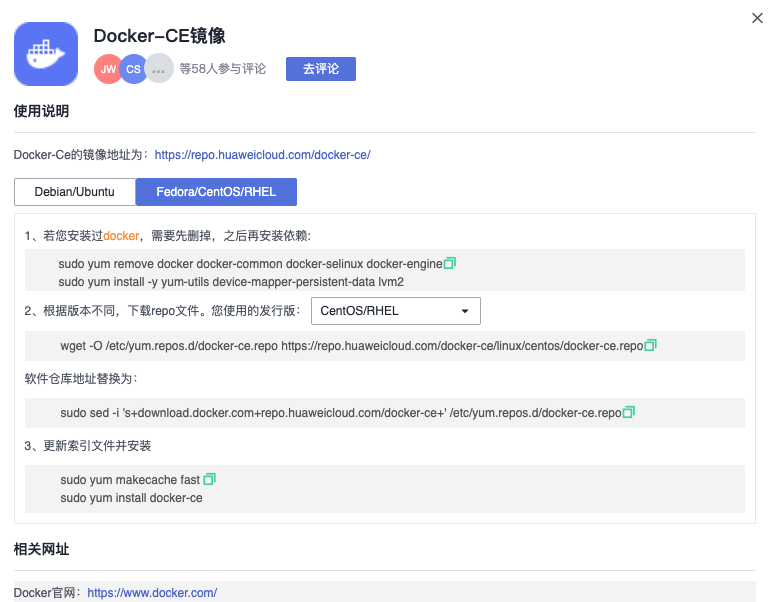
<p>参考华为云开源镜像中Docker-CE镜像的配置。</p>

<p><img src="../img/post-huaweicloud-docker/huaweicloud-docker-1.png" alt="" /></p>

<div class="language-shell highlighter-rouge"><div class="highlight"><pre class="highlight"><code><span class="nb">sudo </span>yum <span class="nb">install</span> <span class="nt">-y</span> yum-utils device-mapper-persistent-data lvm2

wget <span class="nt">-O</span> /etc/yum.repos.d/docker-ce.repo https://repo.huaweicloud.com/docker-ce/linux/centos/docker-ce.repo

<span class="nb">sudo sed</span> <span class="nt">-i</span> <span class="s1">'s+download.docker.com+repo.huaweicloud.com/docker-ce+'</span> /etc/yum.repos.d/docker-ce.repo

<span class="nb">sudo </span>yum makecache fast
<span class="nb">sudo </span>yum <span class="nb">install</span> <span class="nt">-y</span> docker-ce

<span class="nb">sudo </span>systemctl start docker
</code></pre></div></div>

<p>PS：注意以上命令在CentOS8中有问题，只推荐在CentOS7中使用。</p>
<h1 id="docker-compse安装">docker-compse安装</h1>
<p>直接从docker-compse在github的项目中下载指定平台和架构的二进制文件。
比如linux平台 x86_64平台。</p>

<div class="language-shell highlighter-rouge"><div class="highlight"><pre class="highlight"><code>curl <span class="nt">-L</span> https://github.com/docker/compose/releases/download/v2.19.0/docker-compose-linux-x86_64 <span class="nt">-o</span> /usr/local/bin/docker-compose
<span class="nb">chmod</span> +x /usr/local/bin/docker-compose
</code></pre></div></div>

<h1 id="华为云docker镜像加速">华为云docker镜像加速</h1>
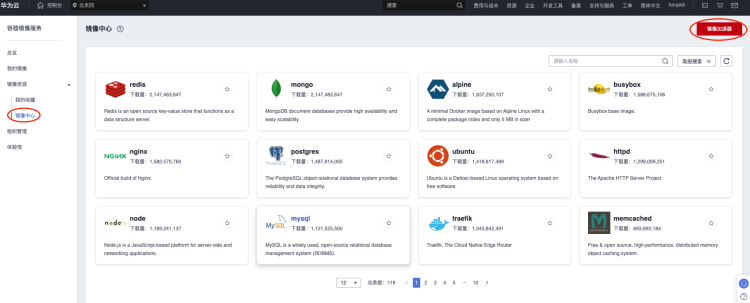
<p>在华为云中支持docker镜像加速。
登录华为云账号后找到SWR服务后，如下图找到镜像加速器按钮。</p>

<p><img src="../img/post-huaweicloud-docker/huaweicloud-docker-2.png" alt="" /></p>

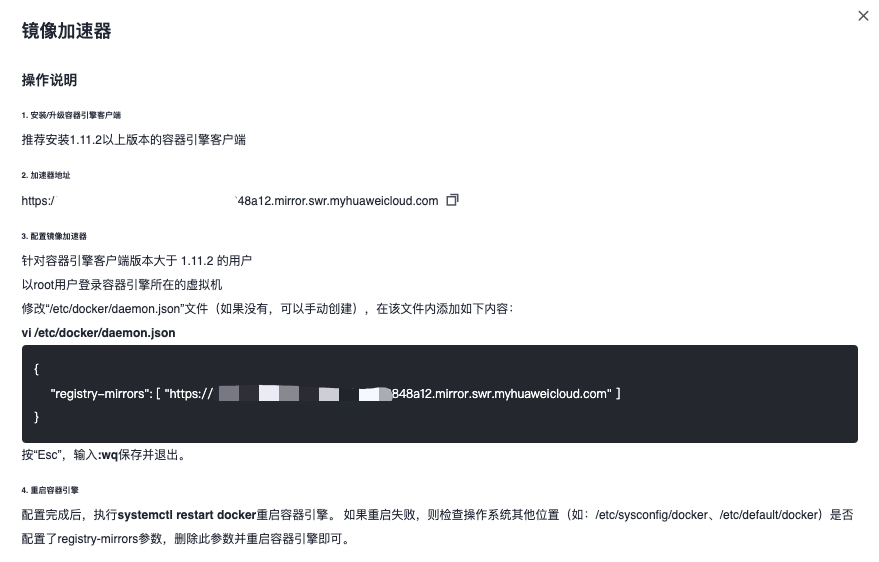
<p>弹出如下配置：</p>

<p><img src="../img/post-huaweicloud-docker/huaweicloud-docker-3.png" alt="" /></p>

<p>配置完成后，重启docker</p>

<div class="language-shell highlighter-rouge"><div class="highlight"><pre class="highlight"><code><span class="nb">sudo </span>systemctl restart docker
</code></pre></div></div>

<h1 id="资料">资料</h1>
<ul>
  <li><a href="https://docs.docker.com/engine/install/centos/">https://docs.docker.com/engine/install/centos/</a></li>
  <li><a href="https://mirrors.tuna.tsinghua.edu.cn/help/docker-ce/">https://mirrors.tuna.tsinghua.edu.cn/help/docker-ce/</a></li>
</ul>]]></content><author><name>Leo</name></author><category term="programme" /><category term="bigdata" /><category term="docker" /><summary type="html"><![CDATA[使用华为云耀云服务器CentOS 7.9版本。 docker安装 参考华为云开源镜像中Docker-CE镜像的配置。]]></summary></entry></feed>